
Custom product options for Shopify
Custom product options for Shopify, without the mess
Give every variant its own options: 9 field types, re-usable option sets, and one clean cart line when an option costs extra. Works on every Shopify plan.
Free plan: 5 product assignments, no time limit. No code required.
The usual workaround
Shopify variants stop where your options begin
Variants don't cover it
An engraving, a pickup date or a logo upload has no place in a size and colour grid. So it lands in the product description and arrives by email instead.
Add-ons litter the cart
Every paid extra becomes its own cart line, its own order line and its own support question. Customers see two lines for one product and hesitate.
Editing 200 products by hand
The same six option fields, retyped on every product. Change one label and the edit has to be repeated everywhere it appears.
What you get
Options per variant, priced without the clutter
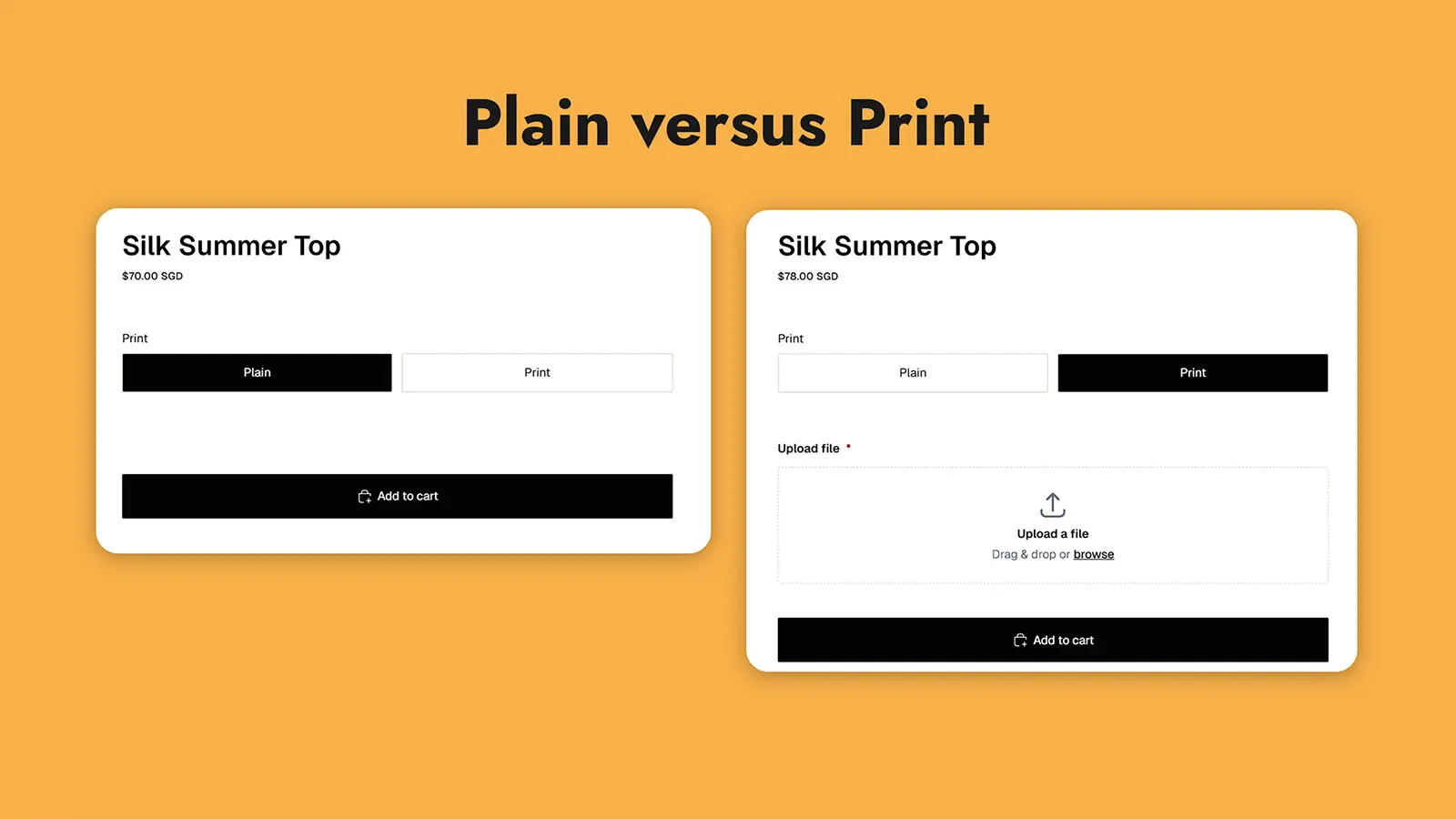
Different options for every variant
A plain shirt asks for nothing, while a print shirt asks for an image. Assign one option set to specific variants and another to the rest of the product, and the storefront swaps them in when the customer picks a variant.
- Assign at product level or variant level
- Options resolve in place on variant change, with no page reload
- As many option sets per product as the option needs
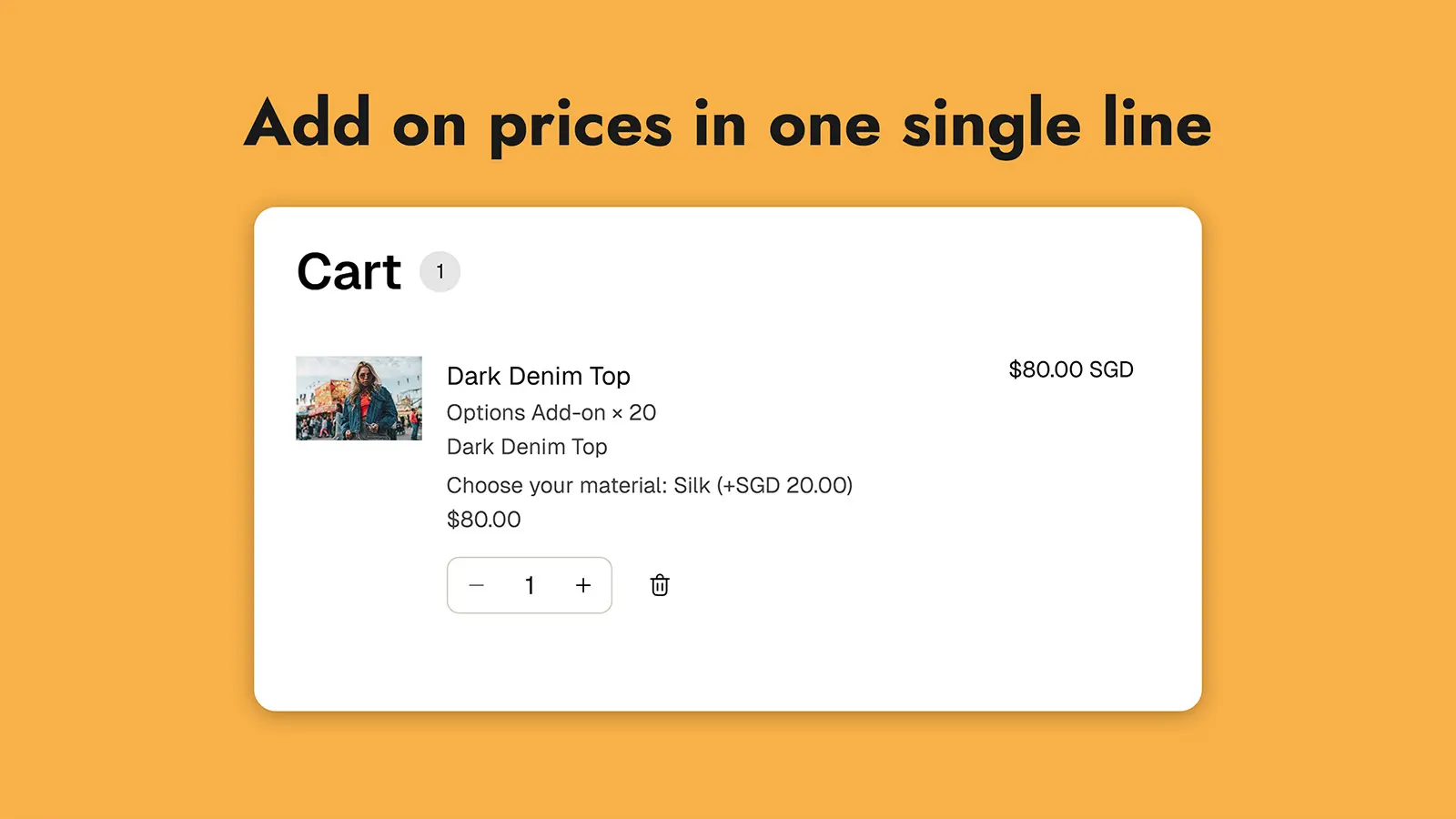
Charge for an option without a second cart line
Set the fee on a variant in your own catalogue, then give the option a quantity. When a customer selects it, Shopify's cart transform merges the fee into the product line at the combined price.
- One cart line at the combined price, in cart and checkout
- Quantity per option or per individual choice
- Prices stay in your Shopify catalogue, never inside the app
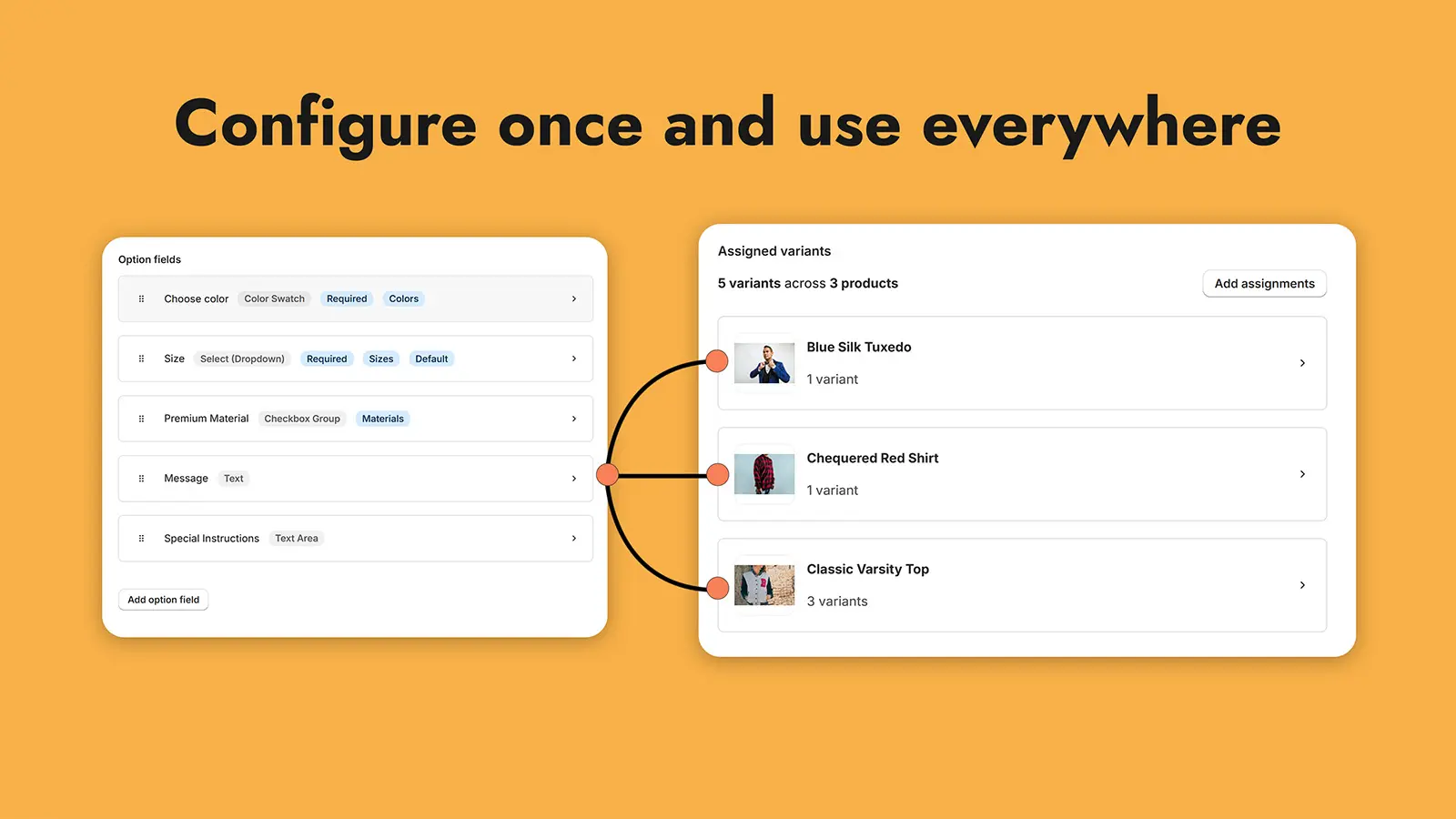
Build once, use everywhere
One option set drives as many products as your plan allows. Edit the option set once and every assigned product shows the change, instead of a hundred product edits.
- Re-usable option sets and re-usable choice sets
- Assign one product, several variants, or a whole catalogue in bulk
- Already over your cap? Editing and removing still work
9 field types
Single line text, multi-line text, dropdown select, colour swatch, image select, single checkbox, checkbox group, date and file upload.
Conditional logic and defaults
Show a field only when another field has the value that matters, and pre-select the choice most customers want. Required fields and minimum or maximum selection counts are enforced before add to cart.
Theme-native and fast
A theme app extension, not an iframe, so fields inherit your theme's fonts and colours. Products without options render no markup, no JavaScript and no request.
How it works
Three steps from install to live
- 1
Create
Build an option set in the app: add your fields, mark the ones that must be filled in, and attach a choice set for colour swatches or image options. Set a quantity on anything that costs extra.
- 2
Assign
Assign the option set to a product, to specific variants, or to many products at once. Assignments show which variant each option set belongs to.
- 3
Add the block
Open a product template in the theme editor and add the Zesty Options block. No theme code to edit, and the setup guide on the app home screen links straight to it.
The honest comparison
Why not just use variants?
Variants are still the right tool for size and colour. Zesty Options adds what variants cannot hold, and never creates a variant of its own, so your variant grid stays exactly as it is.
| What you need | Shopify variants alone | With Zesty Options |
|---|---|---|
| Options that differ between variants | Every variant shares the same product options | Different option sets for different variants of one product |
| An option that costs extra | Becomes another variant for every combination | A fee added to the same cart line, at the combined price |
| Text, dates and file uploads | Not possible | 9 field types, from short text to 20 MB file uploads |
| The same options across products | Rebuilt on every product, one at a time | One re-usable option set assigned to many products |
| Required fields and choice limits | Not enforced | Required fields enforced before add to cart, with minimum and maximum selections |
Who it's for
Built for products that arrive with instructions
Engraving and personalisation
A text field for the engraving and a file upload for the artwork, both attached to the variant that needs them.
Apparel and print on demand
Size and colour stay as Shopify variants. Print placement, thread colour and artwork move into options.
Made to order and custom builds
Required dropdowns and text fields so nothing reaches the workshop half-specified.
Bakeries and food
A date field for pickup, a message field for the cake, and a checkbox for dietary requirements.
Gifts and hampers
Gift message, delivery date and a paid gift-wrap option merged into the product's cart line.
B2B and wholesale
Required account fields, minimum selection counts and a file upload for purchase orders.
Plans
Priced by product assignments, not by option sets
Free
5
product assignments
Try it on five products, for as long as you like.
Pro
300
product assignments
For a growing catalogue with a few paid extras.
Add-on pricing
Growth
1000
product assignments
For busy catalogues with print and personalisation options.
Add-on pricing
Scale
Unlimited
product assignments
For catalogues of any size that want add-on pricing everywhere.
Add-on pricing
Every plan includes unlimited option sets, all 9 field types and conditional logic.
Trust and your data
Your data belongs to you
Uploads stay in your Shopify Files
Customer artwork goes from their browser straight into your own Files library. We never store the file itself, and we never proxy it.
Export whenever you want
Settings emails you CSV files of your option sets, choice sets and assignments. The Import page reads them back.
Uninstall without losing your setup
Uninstalling resets billing and keeps your option sets, choice sets and assignments, so reinstalling brings your setup back. Ask us and we delete it for you.
No customer profiles stored
The storefront statistics we keep are product level: which product had options, and whether they reached the cart. No names, emails, addresses or payment details.
Questions before you install? hello@ludicas.app · Privacy policy · Terms of service
Questions
Answers to the ones that come up first
Which field types does Zesty Options support?
9: single line text, multi-line text, dropdown select, colour swatch, image select, single checkbox, checkbox group, date, and file upload.
Every field can be required or optional, can carry a default value, and can be shown or hidden by conditional logic based on another field.
Why does the cart show one line instead of two?
Add-on fees are added as a second cart line with a hidden pairing token, then Shopify calls our cart transform function server-side before the cart renders.
The function merges the fee line into the product line and the customer sees one line at the combined price, for example 50.00 plus a 2.00 fee shown as 52.00. Cart, checkout and order all show the single merged line.
Do I need Shopify Plus?
No. Zesty Options works on every Shopify plan, including Basic.
Add-on pricing merges the add-on fee into a single cart line using Shopify's cart transform function, which is available on all plans and is not gated behind Shopify Plus.
What happens when I go over my cap or downgrade?
You freeze in place. Existing assignments keep working and keep rendering on your storefront, but you cannot add a new product until you are back under the cap.
Removing assignments is always allowed, and it is the way back under the cap. Upgrading lifts the limit immediately.
Does it slow down my storefront?
Products with no options cost nothing. The block checks a product metafield that the app keeps in sync, and renders no markup, no script and no request for products without options.
Products with options make one request for the assigned option sets, and that data is cached at Cloudflare's edge, so repeat views do not reach the database.
What happens to my data when I cancel or uninstall?
Uninstalling removes the app and resets billing to the Free plan, and we keep your option sets, choice sets and assignments so that reinstalling restores exactly what you had.
Your uploaded files stay in your own Shopify Files library and are untouched by us.
To have your data deleted, email hello@ludicas.app and we will remove it. Shopify's shop redaction request also triggers automatic deletion of your stored data.
Put your options on every variant
Install the app, add the block to one product template, and see it live on your own storefront. Five products are free.